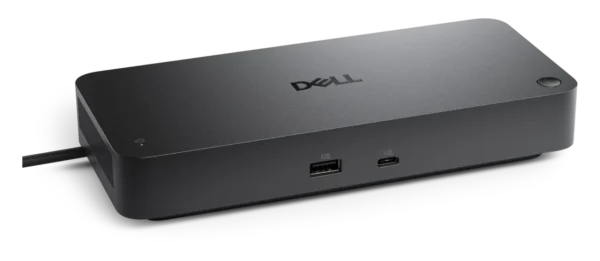
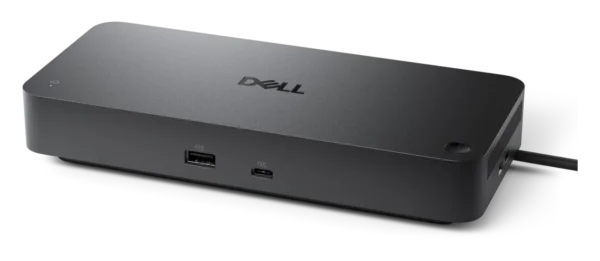
Dell Pro Thunderbolt 4 Smart Dock – 130W PD, Quad Display, 2.5GbE, Remote Management – SD25TB4
₱22,140.00Original price was: ₱22,140.00.₱19,260.00Current price is: ₱19,260.00.
Thunderbolt 4 Performance: Experience lightning-fast 1.25 GB/s data transfer speeds and unmatched reliability through a single Thunderbolt 4 host connection.
Massive Power Delivery: Provides up to 130W of robust power to compatible Dell systems (96W for non-Dell) via the included 180W power adapter.
Quad-Display Mastery: Drive up to four independent monitors utilizing two DisplayPort 1.4 outputs, one HDMI 2.1 port, and a multi-function USB-C DisplayPort.
Ultimate Visual Fidelity: Supports peak resolutions up to a single 8K @ 60Hz display, dual 6K monitors, or an expansive quad 4K @ 60Hz configuration.
Intelligent Remote Management: Perform out-of-band automatic or scheduled firmware updates via the Dell Device Management Console without requiring a host PC.
Enterprise-Grade Security: Features Kernel DMA Protection, Intel AMT over Thunderbolt (with Intel vPro), MAC Address Pass-through, and physical Kensington/Noble lock slots.
Zero Touch Provisioning: Deploy seamlessly across your organization with DHCP Auto Discovery and DNS SRV cloud enrollment capabilities.
Next-Gen Networking: Features a high-speed 2.5 Gigabit Ethernet (RJ-45) port for rapid, lag-free wired network connections, PXE Boot, and Wake-on-LAN.
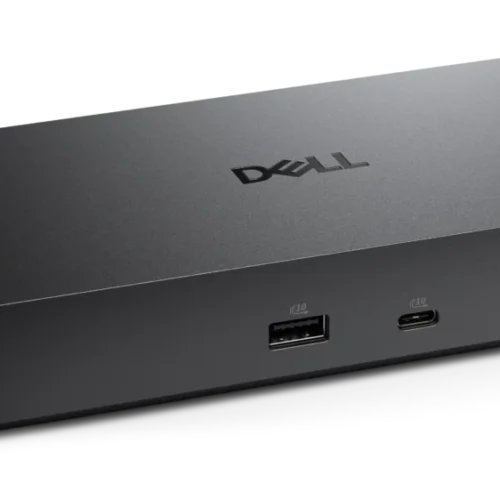
Expansive USB Hub: Connect all your peripherals effortlessly with 6 total USB ports, including four high-speed USB-A 3.2 Gen 2 and dedicated USB-C ports.
Universal OS Support: Fully compatible with Windows 10/11, macOS, ChromeOS, Ubuntu, and Red Hat Enterprise Linux.
For walk-in customers: please always INQUIRE FIRST before visiting as not all items are displayed in our physical store. As an online-first store, most of our inventory is held in our online warehouse and is transferred to the store upon request.
Dell Pro Thunderbolt 4 Smart Dock - 130W PD, Quad Display, 2.5GbE, Remote Management - SD25TB4
Price Drop Alerts & Price History
⚠️ That's a steep drop! You might be waiting a while.
We'll notify you the moment the price hits your target.
Transform your desktop or notebook into a high-performance command center with the Dell Pro Thunderbolt 4 Smart Dock SD25TB4. Engineered for professionals handling incredibly intensive workloads, this state-of-the-art docking station utilizes cutting-edge Thunderbolt 4 technology to deliver unprecedented bandwidth and versatility through a single wired connection. Whether you are transferring massive video files, rendering complex 3D environments, or running demanding financial models, the Thunderbolt 4 host interface ensures a frictionless experience with a maximum data transfer rate of 1.25 GB/s. This allows content creators, engineers, and power users to access external storage and heavy databases instantly, eradicating workflow bottlenecks entirely.
Uncompromising Power Delivery
Battery anxiety is a thing of the past with the Dell Pro Thunderbolt 4 Smart Dock. Backed by a robust 180W power adapter, the dock features intelligent Power Delivery Pass-through designed to keep your primary devices running at peak performance. For users utilizing compatible Dell systems, the dock delivers a staggering 130W of power directly to the host machine. Mixed-fleet environments are equally supported, with the dock providing up to 96W of reliable power to non-Dell notebooks. Beyond charging your laptop, the dock manages the energy requirements of your peripherals flawlessly. It distributes power across its USB ports, including four USB-A 3.2 Gen 2 ports delivering 4.5W each, and a dedicated USB-C 3.2 Gen 2 port capable of pushing 15W, ensuring your smartphones, tablets, and accessories are always charged and ready.
Extreme Visuals with Quad-Display Support
Visual real estate is critical for modern multitasking, and the SD25TB4 pushes the boundaries of monitor expansion. The dock supports connecting up to four independent displays simultaneously, giving you the canvas you need to spread out your applications, timelines, and spreadsheets. Connectivity is incredibly versatile, utilizing two DisplayPort 1.4 outputs, a cutting-edge HDMI 2.1 port, and a multi-function USB-C DisplayPort 1.4 connection.
The resolution capabilities are engineered for the future of digital media. For extreme detail, graphic designers and animators can connect a single 8K display running at a smooth 60Hz. Dual monitor setups can achieve a flawless 6K resolution at 60Hz, while users maximizing all four screens can enjoy crystal-clear 4K quality across the board. Scaling down to QHD or WQHD is fully supported across triple and quad configurations as well, ensuring perfect harmony regardless of your monitor setup.
Revolutionary Smart Management and Cloud Capabilities
What separates the SD25TB4 from standard docking stations is its suite of enterprise-grade smart management features. IT administrators can leverage Cloud Management capabilities without a PC attached, utilizing the Dell Device Management Console to perform automatic or scheduled firmware updates seamlessly. This includes the ability to maintain specific firmware versions or downgrade them entirely out-of-band, minimizing user downtime.
Deployment is drastically simplified through Cloud Management Enrollment, featuring Zero Touch provisioning via DHCP Auto Discovery or DNS SRV. Furthermore, for organizations utilizing Intel vPro PCs, the dock supports Intel AMT over Thunderbolt for deep remote troubleshooting. Additional foundational tools—including Dell Command Update (DCU), Dock Power Button Sync, Port Disablement independent of the PC, and MAC Address Pass-through—give IT teams absolute control and visibility over their fleet.
Seamless Network Integration and Security
A fast, stable network connection is vital for cloud-based applications and large data syncing. The Dell Pro Thunderbolt 4 Smart Dock is equipped with an advanced 2.5 Gigabit Ethernet (RJ-45) port, providing two and a half times the bandwidth of traditional Gigabit connections. This significantly accelerates intranet file sharing and reduces latency during critical video conferences. The dock also supports crucial networking protocols like Wake-on-LAN, PXE Boot, and WLAN to LAN Switching.
Protecting corporate data is prioritized through Kernel Direct Memory Access (DMA) Protection, which prevents malicious peripherals from accessing system memory. Physically, the dock can be locked down in shared workspaces or open offices utilizing the integrated Kensington Security Slot or Noble Wedge Security Slot.
Broad Compatibility and What’s in the Box
The Dell SD25TB4 is universally compatible, offering seamless integration across a diverse array of operating systems. Whether your organization relies on Windows 10, Windows 11, macOS, ChromeOS, Ubuntu, or Red Hat Enterprise Linux, this dock serves as the ultimate universal bridge for your peripherals. Windows users can further optimize their experience using the dedicated Dell Firmware Utility and Dell Display and Peripheral Manager.
Packaged in a sleek, space-saving design measuring 8.07 inches wide by 3.54 inches deep and just 1.39 inches high, the dock weighs a travel-friendly 1.28 lbs. Inside the box, you will find everything needed to elevate your workspace immediately: the Pro Thunderbolt 4 Smart Dock SD25TB4, the 180W power adapter and heavy-duty power cord, alongside all necessary documentation, including a Quick Start Guide and regulatory information. To guarantee peace of mind, Dell backs this premium dock with a 3-Year Limited Hardware Warranty featuring Advanced Exchange, with optional 4- and 5-year extensions available.
Specifications: Dell Pro Thunderbolt 4 Smart Dock - SD25TB4
General Information
Brand Name
Dell
Manufacturer
Dell Technologies
Manufacturer Part Number
R56G3
Dell Part Number
w73wg0
Product Name
Pro Thunderbolt 4 Smart Dock - SD25TB4
Product Type
Docking Station
Product Series
Pro
Product Model
SD25TB4
Offer ID
sd25tb4_dock
Technical Information
Connectivity Technology
Wired
Device Supported
Desktop PC
Notebook
Host Interface
Thunderbolt 4 (Supporting USB Power Delivery up to 96W via Built-In Connector)
Maximum Data Transfer Rate
1.25 GB/s
Interfaces / Ports
Total Number of USB Ports
6
USB Type-A Ports
4x USB-A 3.2 Gen 2 (10 Gbps)
USB Type-C Ports
2x Total:
1 x USB-C 3.2 Gen 2 Multi-function DisplayPort 1.4
1 x USB-C 3.2 Gen 2 (10 Gbps)
4 x USB-A 3.2 Gen 2 (4.5W each)
1 x USB-C 3.2 Gen 2 (15W)
Power Source Type
Power Adapter (Included AC Adapter with Barrel Connector)
Network & Communication
Network (RJ-45)
Yes
Ethernet Technology
2.5 Gigabit Ethernet
Networking Features
Wake-on-LAN, PXE Boot, MAC Address Pass-through, WLAN to LAN Switch
Management & Security
General Management Features
Dell Command Update (DCU)
Dock Power Button Sync
Intel AMT over Thunderbolt with select Intel vPro PCs
Kernel Direct Memory Access (DMA) Protection
Port Disablement
Dock Management Features
Remote firmware updates without a PC
Host-based firmware updates
Firmware update on disconnect
Port Disablement independent of PC
Cloud Management (No PC required)
Dell Device Management Console enables:
- Automatic or scheduled firmware updates
- Maintain specific firmware version or downgrade
- Peripheral inventory and status
Cloud Management Enrollment
Zero Touch provisioning with DHCP Auto Discovery or DNS SRV
Dell Display and Peripheral Manager
Dell Management Agent
Windows 10
Windows 11
ChromeOS
macOS
Ubuntu
Red Hat Enterprise Linux
Host Software (Windows)
Dell Firmware Utility
Dell Display and Peripheral Manager
Physical Characteristics & Miscellaneous
Dimensions (W x D x H)
8.07" x 3.54" x 1.39" (20.5 x 8.99 x 3.53 cm)
Weight (Approximate)
1.28 lb (0.58 kg)
Package Contents
Pro Thunderbolt 4 Smart Dock - SD25TB4
Power adapter and power cord
Documentation (Quick Start Guide, Safety, Environmental, and Regulatory Information)
Only logged in customers who have purchased this product may leave a review.
ℹ️
Product Information Notice
Specifications, images, packaging, and included accessories shown on this page are based on information published by the manufacturer and are provided for reference only. Manufacturers may revise product specifications, features, SKUs, and designs at any time and without prior notice, and actual specifications may vary between board revisions, production batches, or regional versions of the same model.
While we take care to keep our listings accurate, we recommend verifying critical specifications on the manufacturer's official product page before purchasing. If a particular specification is essential to your purchase decision or build compatibility, please confirm it with our team first and we will verify the exact unit on hand.
Product images are for illustration purposes and may differ from the actual item. If you spot an error in any listing, please let us know so we can correct it promptly.















Reviews
There are no reviews yet.