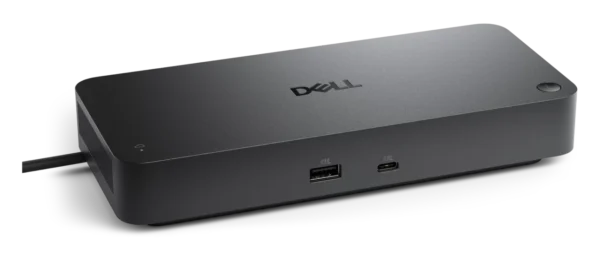
Dell Pro Smart Dock – Up to 130W PD, 4 Displays, 2.5GbE, Remote Management – SD25
₱17,380.00Original price was: ₱17,380.00.₱15,120.00Current price is: ₱15,120.00.
Massive Power Delivery: Provides up to 130W of charge to Dell notebooks (96W for non-Dell) via a high-capacity 180W power adapter.
Quad-Display Support: Drive up to four independent monitors utilizing HDMI 2.1, two DisplayPort 1.4 outputs, and a USB-C Multi-function DisplayPort.
Ultra-High Resolution: Supports up to a single 6K display at 60 Hz, dual 5K setups, or expansive quad WQHD/HD configurations.
Smart Remote Management: Update firmware and manage settings remotely via Wi-Fi through the Dell Device Management Console without interrupting end-users.
Advanced Data Security: Built-in hardware encryption, Kernel DMA Protection, and WPA-3 192-bit Wi-Fi encryption keep your network secure.
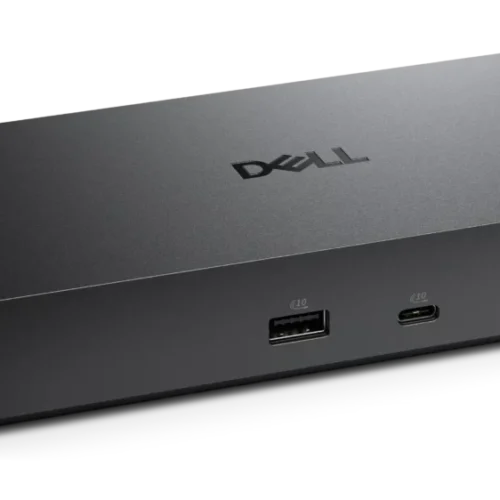
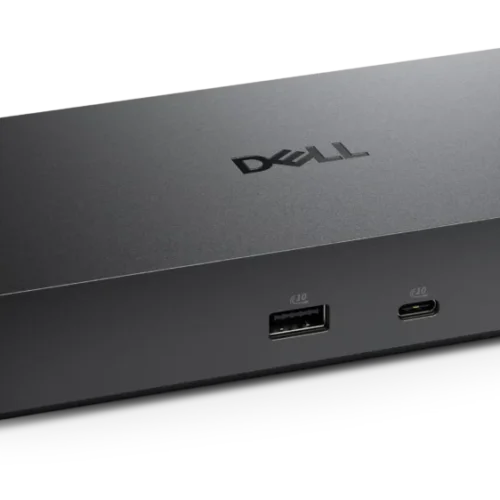
10-Port Expandability: Features 6 high-speed USB 3.2 Gen 2 ports (4x Type-A, 2x Type-C) delivering up to 1.25 GB/s data transfer rates.
Lightning-Fast Networking: Integrated 2.5 Gigabit Ethernet (RJ-45) port for incredibly fast and stable wired internet access.
Always-On Charging: Peripherals connected to the USB ports can charge continuously even when the host PC is disconnected.
Universal OS Compatibility: Works seamlessly with Windows 10/11, macOS, ChromeOS 137, Ubuntu 24.04, and Red Hat Enterprise Linux 9.6.
Sustainable Engineering: Built with at least 65% post-consumer recycled materials and shipped in 100% recycled or renewable packaging.
For walk-in customers: please always INQUIRE FIRST before visiting as not all items are displayed in our physical store. As an online-first store, most of our inventory is held in our online warehouse and is transferred to the store upon request.
Dell Pro Smart Dock - Up to 130W PD, 4 Displays, 2.5GbE, Remote Management - SD25
Price Drop Alerts & Price History
⚠️ That's a steep drop! You might be waiting a while.
We'll notify you the moment the price hits your target.
Empower Your Workspace with the Dell Pro Smart Dock SD25
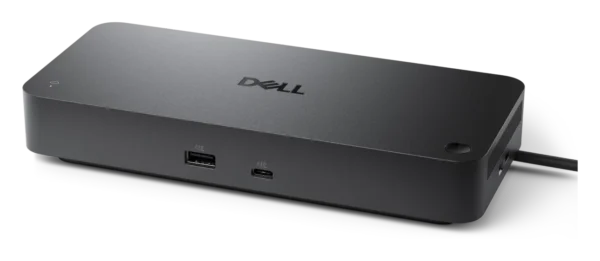
Redefine how you connect, charge, and manage your workstation with the Dell Pro Smart Dock SD25. Engineered for extreme agility and massive power output, this sophisticated docking station serves as the central nervous system for any professional desktop or notebook setup. Designed to eliminate desk clutter while providing unprecedented remote management capabilities, the SD25 transforms a single USB Type-C connection into an absolute powerhouse of productivity. With its innovative ambidextrous USB-C cable routing, you can easily configure the cable to run out the left or right side of the dock, accommodating any workspace layout effortlessly.
Exceptional Visual Performance and Multi-Display Mastery
The modern professional requires expansive visual real estate, and the Dell Pro Smart Dock SD25 excels by driving up to four independent displays simultaneously. By leveraging two dedicated DisplayPort 1.4 ports, one ultra-high-bandwidth HDMI 2.1 port, and a USB-C Multi-function DisplayPort, this dock offers the flexibility to tailor your monitor setup exactly to your workflow requirements.
If peak resolution is your goal, the SD25 effortlessly supports an incredibly crisp 6K display at a 60 Hz refresh rate for high-end graphic design, CAD work, or video editing. If multiple screens are necessary, you can configure dual 5K monitors at 60 Hz or push the boundaries with quad WQHD or HD displays. For standard ultra-wide or high-definition setups, the dock scales perfectly to provide triple FHD or quad HD arrangements, ensuring zero visual bottleneck regardless of your chosen monitor configuration.
Unrivaled Power Delivery
Power hungry laptops are no match for the massive 180W power supply driving the Dell Pro Smart Dock SD25. Capable of passing an astounding 130W of USB-C power delivery directly to compatible Dell systems, it keeps your primary workstation fully charged under the most intense processing loads. For non-Dell systems, it reliably provides up to 96W of continuous power. This effectively removes the need to carry your bulky proprietary laptop charger, simplifying your desk and your travel bag.
Beyond the host device, the dock features dynamic peripheral charging. The array of USB ports deliver consistent power with or without a PC attached. You gain access to four USB-A 3.2 Gen 2 ports delivering 4.5W each, one robust USB-C 3.2 Gen 2 port pushing 15W, and the Multi-function USB-C DisplayPort outputting 7.5W. This means your smartphones, wireless headphones, and tablets can charge quickly directly from the dock, even when your computer is disconnected.
Next-Generation Connectivity and Speed
The Dell Pro Smart Dock SD25 boasts a phenomenal 10 total ports, allowing you to connect all your accessories simultaneously. The six super-speed USB 3.2 Gen 2 ports (four Type-A and two Type-C) facilitate blistering maximum data transfer rates of 1.25 GB/s (10 Gbps), perfect for accessing large media files on external SSDs instantly.
To guarantee a stable connection to your corporate network or home internet, the SD25 features a state-of-the-art 2.5 Gigabit Ethernet (RJ-45) port. This connection provides 2.5 times the bandwidth of traditional Gigabit Ethernet, dramatically speeding up intranet transfers, large server downloads, and providing a flawless, lag-free connection for critical video conferences.
Intelligent Remote Management and Fortified Security
Where the SD25 truly earns its “Smart” moniker is in its enterprise-grade deployment and management capabilities. Using the Dell Device Management Console, IT administrators can securely manage the dock over Wi-Fi without needing an end-user present. This includes scheduling fleetwide firmware updates during off-hours to eliminate workflow interruptions. Standard management features such as PXE Boot, Wake-on-LAN, MAC Address Pass-through, Port Disablement, and Dock Power Button Sync are fully integrated.
Security is never compromised. The dock supports enterprise-grade WPA-3 192-bit encryption for secure Wi-Fi communication and relies on tamper-resistant, hardware-based encryption alongside Kernel Direct Memory Access (DMA) Protection to safeguard your sensitive corporate data. Physically, the device can be secured to the desk using the built-in Kensington Security Slot.
Seamless Compatibility and Environmental Responsibility
The Dell SD25 is completely OS-agnostic, providing out-of-the-box compatibility with Windows 10, Windows 11, macOS, ChromeOS 137, Ubuntu 24.04, and Red Hat Enterprise Linux 9.6. Simply plug it in, and the dock immediately harmonizes with your hardware.
Dell Technologies has also prioritized the planet with the design of the SD25. The durable plastic enclosure is constructed with an impressive 65% post-consumer recycled material. Furthermore, it arrives at your doorstep in 100% recycled or renewable packaging. Measuring just 8.07 inches wide, 3.54 inches deep, and weighing only 1.24 lbs, this compact powerhouse includes the smart dock, the 180W power adapter and cord, and the necessary quick start documentation, all backed by a 3-Year Limited Hardware Warranty with Advanced Exchange.
Specifications: Dell Pro Smart Dock - SD25
General Information
Brand Name
Dell
Manufacturer
Dell Technologies
Manufacturer Part Number
8NNNY
Dell Part Number
mr5xdk
Product Name
Pro Smart Dock - SD25
Product Type
Docking Station
Product Series
Pro
Product Model
SD25
Offer ID
sd25_dock
UPC
884116493709
Packaged Quantity
1
Enclosure Material
Plastic
Technical Information
Connectivity Technology
Wired
Device Supported
Desktop PC
Notebook
Host Interface
USB Type-C with DP Alt Mode Connector (Ambidextrous route design)
Maximum Data Transfer Rate
1.25 GB/s
Interfaces / Ports
Total Number of Ports
10
Total Number of USB Ports
6
USB Type-A Ports
4x USB-A 3.2 Gen 2 (10 Gbps)
USB Type-C Ports
2x Total:
1 x USB-C 3.2 Gen 2 Multi-function DisplayPort 1.4
1 x USB-C 3.2 Gen 2 (10 Gbps)
4 x USB-A 3.2 Gen 2 (4.5W each)
1 x USB-C 3.2 Gen 2 (15W)
1 x USB-C Multi-function DisplayPort (7.5W)
All deliver power with or without PC
Power Source Type
Power Supply (Included AC Adapter with Barrel Connector)
Network & Communication
Network (RJ-45)
Yes
Ethernet Technology
2.5 Gigabit Ethernet (2.5 GbE)
Networking Features
Wake-on-LAN, PXE Boot, MAC Address Pass-through, WLAN to LAN Switch
Management & Security
Management Features
Dock Power Button Sync
Firmware update on disconnect
Host PC based firmware update
Kernel Direct Memory Access (DMA) Protection
Port Disablement
Dell Device Management Console (Over Wi-Fi updates, Schedule off-hours updates)
Security Slot Type
Kensington Security Slot
Data Security
Enterprise-grade WPA-3 192-bit encryption for Wi-Fi
Hardware-based encryption
Software & Compatibility
Operating Systems Supported
Windows 10
Windows 11
ChromeOS 137
macOS
Ubuntu 24.04
Red Hat Enterprise Linux 9.6
Physical Characteristics & Miscellaneous
Dimensions (W x D x H)
8.07" x 3.54" x 1.39" (20.5 x 8.99 x 3.53 cm)
Weight (Approximate)
1.24 lb (0.56 kg)
Eco-Design / Sustainability
Post-consumer-waste%: 65%
100% recycled or renewable packaging
Package Contents
Pro Smart Dock - SD25
Power Adapter and Power Cord
Documentation (Quick Start Guide, Safety, Environmental, and Regulatory Information)
Only logged in customers who have purchased this product may leave a review.
ℹ️
Product Information Notice
Specifications, images, packaging, and included accessories shown on this page are based on information published by the manufacturer and are provided for reference only. Manufacturers may revise product specifications, features, SKUs, and designs at any time and without prior notice, and actual specifications may vary between board revisions, production batches, or regional versions of the same model.
While we take care to keep our listings accurate, we recommend verifying critical specifications on the manufacturer's official product page before purchasing. If a particular specification is essential to your purchase decision or build compatibility, please confirm it with our team first and we will verify the exact unit on hand.
Product images are for illustration purposes and may differ from the actual item. If you spot an error in any listing, please let us know so we can correct it promptly.
















Reviews
There are no reviews yet.