Dell Pro Dock – Up to 100W PD, 4 Displays, Dual DP 1.4, HDMI 2.1, 2.5GbE – WD25
₱14,530.00Original price was: ₱14,530.00.₱12,640.00Current price is: ₱12,640.00.
Universal Connectivity: Connects desktop and notebook PCs via a high-speed USB Type-C host interface featuring DisplayPort Alt Mode.
Unmatched Multi-Display Support: Drive up to four simultaneous displays with resolutions reaching up to 8K @ 60Hz for single screens, and expansive 4K, 5K, 6K, and QHD multi-monitor configurations.
High-Speed Video Ports: Equipped with 2 x DisplayPort 1.4, 1 x HDMI 2.1, and 1 x Multi-function USB-C DisplayPort 1.4 output for premium visual fidelity.
Rapid Power Delivery: Provides up to 100W of power delivery to Dell systems (96W for non-Dell) via a robust 130W included power adapter.
Next-Gen Networking: Features lightning-fast 2.5 Gigabit Ethernet (RJ-45) for lag-free, high-bandwidth wired connections.
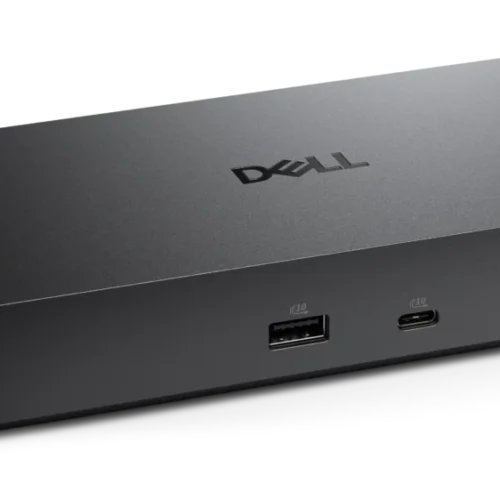
Expansive Peripheral Connections: Offers 6 total USB ports, including 4 x USB-A 3.2 Gen 2 (10 Gbps) and 2 x USB-C 3.2 Gen 2 ports for accessories and rapid 1.25 GB/s data transfer.
Enterprise IT Management: Includes MAC Address Pass-through, PXE Boot, Wake-on-LAN, Dock Power Button Sync, and seamless integration with Dell Command Update.
Broad OS Compatibility: Fully compatible with Windows 10/11, macOS, ChromeOS 137, Ubuntu 24.04, and Red Hat Enterprise Linux 9.6.
Eco-Friendly Design: Constructed from 65% post-consumer recycled plastics with an energy-efficient standby mode that reduces power consumption by 72%.
Physical Security: Integrated slots for both Kensington and Noble Wedge physical security locks.
For walk-in customers: please always INQUIRE FIRST before visiting as not all items are displayed in our physical store. As an online-first store, most of our inventory is held in our online warehouse and is transferred to the store upon request.
Dell Pro Dock - Up to 100W PD, 4 Displays, Dual DP 1.4, HDMI 2.1, 2.5GbE - WD25
Price Drop Alerts & Price History
⚠️ That's a steep drop! You might be waiting a while.
We'll notify you the moment the price hits your target.
Transform Your Workspace with the Dell Pro Dock WD25
Boost your productivity and streamline your desk setup with the latest pro-grade docking station from Dell Technologies. The Dell Pro Dock WD25 is engineered for professionals who demand seamless connectivity, rapid data transfer, and uncompromising multi-display support. Whether you are building a command center for advanced content creation, a versatile office desk, or a robust remote work environment, this docking station centralizes all your essential peripherals into a single, highly manageable hub. By utilizing a cutting-edge wired USB Type-C connection with DisplayPort Alternate Mode, the WD25 eliminates cable clutter while simultaneously powering your notebook and connecting you to a wider digital ecosystem.
Unmatched Multi-Display Versatility
For multitasking professionals, visual real estate is critical. The Dell Pro Dock WD25 is designed to drive an unprecedented number of high-resolution monitors, supporting up to four simultaneous displays to dramatically enhance your workflow. With a diverse array of video interfaces—including two DisplayPort 1.4 outputs, one ultra-high-bandwidth HDMI 2.1 port, and a multi-function USB-C DisplayPort 1.4 output—you can easily configure the ideal multi-monitor setup for your specific needs.
The maximum resolution capabilities are staggering, allowing you to push the boundaries of visual fidelity. The WD25 supports an 8K display at a smooth 60 Hz for single-monitor precision tasks, making it a perfect fit for graphic designers, video editors, and animators. If you prefer a dual-screen arrangement, the dock effortlessly drives two 6K or two 4K displays at 60 Hz. Power users requiring a sprawling quad-display setup can maintain sharp 4K clarity across all four screens or optimize their configuration with Quad HD (QHD) monitors. This incredible flexibility ensures your workstation is future-proofed for the next generation of visual content.
Robust Power Delivery and Performance
A modern workspace requires reliable, continuous power, and the Dell Pro Dock WD25 delivers exceptional energy management. Powered by an included 130W AC power adapter with a traditional barrel connector, the dock provides intelligent power delivery pass-through capable of sending up to 100W directly to compatible Dell systems. For non-Dell notebooks and devices, it provides an impressive 96W of power, ensuring that laptops from a variety of manufacturers remain fully charged even under demanding workloads. This single-cable charging solution means you can leave your proprietary laptop charger in your travel bag.
In addition to fueling your primary workstation, the dock intelligently distributes power to your peripherals. The integrated USB ports are specifically configured for accessory charging, featuring a robust USB-C 3.2 Gen 2 port capable of outputting 15W, alongside four high-speed USB-A 3.2 Gen 2 ports delivering 4.5W each. Beyond power, performance is guaranteed with a maximum data transfer rate of 1.25 GB/s, enabling lightning-fast file transfers to external storage drives and ensuring zero-lag performance for all connected devices.
Comprehensive Connectivity and Networking
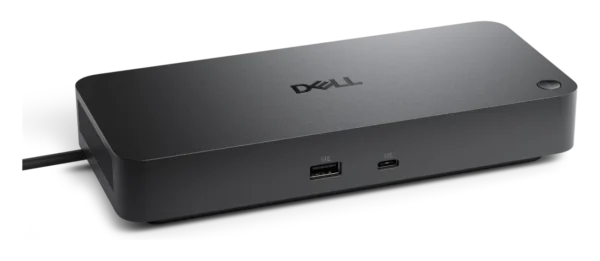
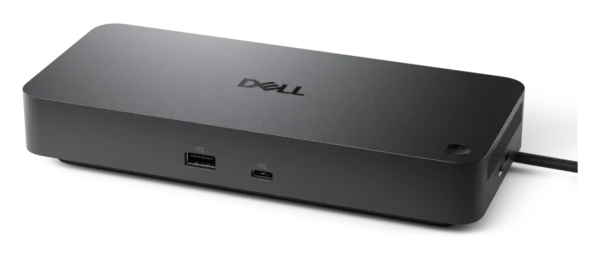
At the core of the WD25’s design is its expansive suite of input and output ports. The dock provides a total of six high-speed USB interfaces, guaranteeing you will never run out of room for keyboards, mice, webcams, and hard drives. The inclusion of an ambidextrous 2.95-foot (0.9 m) integrated USB-C cable gives you the freedom to route the connection to the left or right side of your desk, accommodating any laptop orientation with ease.
In today’s fast-paced digital environment, a stable and incredibly fast network connection is non-negotiable. The Dell Pro Dock steps up to the challenge with an integrated 2.5 Gigabit Ethernet (RJ-45) port. This ultra-fast wired networking capability provides significantly more bandwidth than traditional Gigabit Ethernet, dramatically reducing latency during heavy server uploads, large database downloads, or intense streaming sessions.
Enterprise-Grade Management and Security
IT departments and commercial users will appreciate the extensive suite of remote management and security features built into the Dell Pro Dock WD25. It is fully integrated with Dell Command Update (DCU) and the Dell Device Management Console, allowing IT administrators to seamlessly deploy firmware updates across entire workspaces. The dock features Dock Power Button Sync, waking up the host PC seamlessly, and MAC Address Pass-through, maintaining network identity security.
Additional enterprise capabilities include Preboot Execution Environment (PXE) Boot, Wake-on-LAN, Port Disablement, and Kernel Direct Memory Access (DMA) Protection. Furthermore, the dock supports Intel AMT over Thunderbolt for select Intel vPro PCs. To protect the physical hardware in open-office or shared environments, the WD25 includes dual physical lock slots—accommodating both Kensington and Noble Wedge security standards.
Broad Compatibility and Sustainable Design
The Dell Pro Dock WD25 (Manufacturer Part Number: PTC1N) is engineered to be universally adaptable across different operating systems. Whether your organization utilizes Windows 10, Windows 11, ChromeOS 137, macOS, Ubuntu 24.04, or Red Hat Enterprise Linux 9.6, this docking station serves as a unifying bridge for all hardware. Dedicated host software for Windows, including the Dell Firmware Utility and Dell Display and Peripheral Manager, adds an extra layer of user customization and control.
Finally, the WD25 champions modern sustainability efforts. Designed with physical dimensions of 8.07 inches wide, 3.54 inches deep, and a slim 1.39-inch height, the 1.21 lb chassis is constructed using at least 65% post-consumer recycled materials. It arrives in 10% recycled or renewable packaging and is engineered to reduce power consumption by up to 72% while in standby mode. Included in the box is the docking station itself, a power adapter and power cord, and essential documentation to get you started immediately.
Specifications: Dell Pro Dock - WD25
General Information
Brand Name
Dell
Manufacturer
Dell Technologies
Manufacturer Part Number
PTC1N
Dell Part Number
n1t6g8
Product Name
Pro Dock - WD25
Product Type
Docking Station
Product Series
Pro
Product Model
WD25
Offer ID
wd25_dock
Technical Information
Connectivity Technology
Wired
Device Supported
Desktop PC
Notebook
Host Interface
USB Type-C with DP Alt Mode Connector
Cable Length
2.95 ft (0.9 m)
Maximum Data Transfer Rate
1.25 GB/s
Interfaces / Ports
Total USB Ports
6
USB Type-A Ports
4x USB-A 3.2 Gen 2 (10 Gbps)
USB Type-C Ports
2x Total:
1 x USB-C 3.2 Gen 2 Multi-function DisplayPort 1.4
1 x USB-C 3.2 Gen 2 (10 Gbps)
4 x USB-A 3.2 Gen 2 (4.5W each)
1 x USB-C 3.2 Gen 2 (15W)
Power Source Type
Power Adapter (Included AC Adapter with Barrel Connector)
Network & Communication
Network (RJ-45)
Yes
Ethernet Technology
2.5 Gigabit Ethernet (2.5 GbE)
Networking Features
Wake-on-LAN, PXE Boot, MAC Address Pass-through, WLAN to LAN Switch
Management & Security
Management Features
Dell Command Update (DCU)
Dock Power Button Sync
Firmware update on disconnect
Host PC based firmware update
Intel AMT over Thunderbolt (with select Intel vPro PCs)
Kernel Direct Memory Access (DMA) Protection
Port Disablement
Via host PC software / Dell Device Management Console enables:
- Automatic firmware updates
- Maintain specific firmware version or downgrade
- Peripheral inventory and status
Physical Characteristics & Miscellaneous
Dimensions (W x D x H)
8.07" x 3.54" x 1.39" (20.5 x 8.99 x 3.53 cm)
Weight (Approximate)
1.21 lb (0.55 kg)
Eco-Design / Sustainability
Built with at least 65% post-consumer recycled materials
10% recycled or renewable packaging
Up to 72% power consumption reduction on standby
Package Contents
Docking Station
Power Adapter and Power Cord
Documentation (Quick Start Guide, Safety, Environmental, and Regulatory Information)
Only logged in customers who have purchased this product may leave a review.
ℹ️
Product Information Notice
Specifications, images, packaging, and included accessories shown on this page are based on information published by the manufacturer and are provided for reference only. Manufacturers may revise product specifications, features, SKUs, and designs at any time and without prior notice, and actual specifications may vary between board revisions, production batches, or regional versions of the same model.
While we take care to keep our listings accurate, we recommend verifying critical specifications on the manufacturer's official product page before purchasing. If a particular specification is essential to your purchase decision or build compatibility, please confirm it with our team first and we will verify the exact unit on hand.
Product images are for illustration purposes and may differ from the actual item. If you spot an error in any listing, please let us know so we can correct it promptly.



















Reviews
There are no reviews yet.